 Spreadsheet Confession
Many-to-Many Relationships Explained Without the Jargon
Projects with many people, people on many projects: how the linking record works, explained through everyday examples instead of database theory.
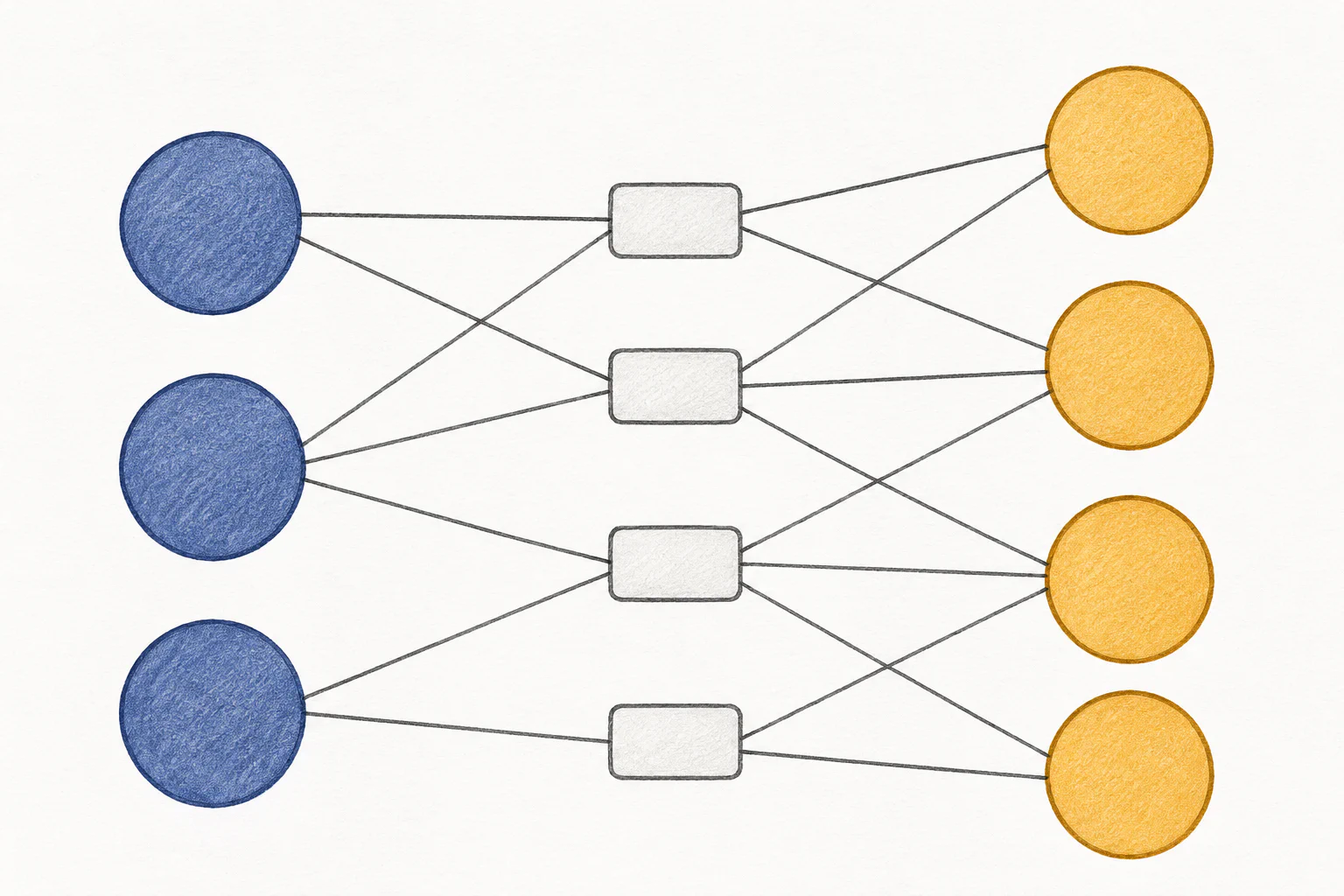
Your project tracker has a column called “Team”. In it, someone has typed “Priya, Marcus, Jo (part-time), Dev?” Now your manager wants to know how many projects Marcus is on, and how many hours he’s committed across all of them. You can search for “Marcus”, but you’ll also find “Marcus W”, and the hours aren’t anywhere at all.
You’ve run into a many-to-many relationship. It sounds technical, but you deal with them every day. The fix is one simple idea.
Spotting a many-to-many relationship
A relationship describes how two kinds of things connect. Most are easy to picture:
- One-to-many: one client has many invoices, but each invoice belongs to one client.
- Many-to-many: one project has many people, and one person works on many projects.
The test is to ask the question both ways. “Can a project have more than one person?” Yes. “Can a person be on more than one project?” Yes. Two yeses means many-to-many.
Once you start looking, they’re everywhere:
- Students and courses
- Products and orders
- Suppliers and the parts they supply
- Employees and the training sessions they’ve attended
- Articles and tags
From Rows to Records: How to Think About Your Data Like an Application introduced the idea of relationships between records. This post deals with the type that spreadsheets handle worst.
Why spreadsheets fumble it
A spreadsheet row can only sit in one place, so people improvise. You’ve probably seen all three of these workarounds:
- The crammed cell. “Priya, Marcus, Jo” in one cell. Easy to type, impossible to count, filter or report on reliably.
- The numbered columns. “Team member 1”, “Team member 2”, up to “Team member 6”. Then project seven needs a seventh person, and finding everyone Marcus works with means searching six columns.
- The grid. People down the side, projects across the top, an “X” where they meet. It looks tidy until you have 80 projects and need to record anything more than an X.
All three share the same flaw: there’s nowhere to put information about the connection itself.
The linking record
Here’s the idea that solves it. Instead of trying to link people and projects directly, you create a third kind of record whose only job is to represent one connection.
Call it an assignment. Each assignment record says: this person is on this project. That’s it. If Marcus is on four projects, he has four assignment records. If a project has five people, it has five assignment records.
| Assignment | Person | Project |
|---|---|---|
| ASG-001 | Priya | Warehouse move |
| ASG-002 | Marcus | Warehouse move |
| ASG-003 | Marcus | Website refresh |
| ASG-004 | Jo | Website refresh |
Engineers call this a “junction table” or “join table”. You can call it whatever makes sense to your team. The point is that a connection becomes a thing you can store, count and describe.
Note that the Person and Project columns aren’t typed names. In a proper tool, they’re links to the actual person and project records, which is what makes the counting reliable. Unique IDs: The Boring Field That Saves Your Migration explains why that matters.
The connection usually has its own facts
This is where the linking record really earns its place. Very often, the most important information belongs neither to the person nor to the project, but to the connection between them.
Go back to Marcus. His hours aren’t a property of Marcus (he works on several projects) or of the project (other people work on it too). They belong to “Marcus on the Warehouse move”. So they go on the assignment record:
- Role on this project (lead, contributor, reviewer)
- Hours per week committed
- Start and end date on the project
- Billing rate, if it varies by project
The same pattern turns up everywhere once you notice it. An order line is the linking record between an order and a product, and it holds the quantity and the price paid. A training completion links a person to a course, and it holds the date and the certificate. A supplier’s price for a part depends on both the supplier and the part, so it lives on the link.
If you find yourself wondering “where does this field go?” and the honest answer is “it depends on both of them”, you’ve found a linking record.
What you get once it’s set up
With assignments as their own records, the questions that were painful become simple views:
- All of Marcus’s projects: filter assignments by person.
- His total committed hours: sum the hours on those assignments.
- Who’s over-allocated: group assignments by person, show anyone whose total is above, say, 40 hours.
- Who has worked on any project for this client: follow the links from client to projects to assignments to people.
Most no-code database platforms let you show linked records inline, so on Marcus’s person record you see a list of his assignments without opening another screen. Nobody using the tool day to day needs to know there’s a third record type underneath.
Common mistakes
- Skipping the linking record “for now”. A simple multi-select link between people and projects works until you need hours or roles. Then you have to rebuild. If there’s any chance the connection has its own facts, start with the linking record.
- Duplicate connections. Marcus assigned to the same project twice. Add a check, or a view that flags duplicates.
- Deleting instead of ending. When someone leaves a project, set an end date on the assignment rather than deleting it. You’ll want that history later.
Where to start this week
- Find your crammed cells. Look for any column where people type several names or items separated by commas. Each one is a many-to-many relationship in hiding.
- Ask the both-ways question for each one to confirm it.
- List the facts about the connection. For each, write down what information belongs to the pairing rather than either side. That list is your linking record’s fields.
- Name the linking record in plain words your team already uses: assignment, enrolment, order line, membership.